


Key Takeaways
You've probably been through at least one event where the registration platform worked fine until the show floor got busy, and then the team fell back on spreadsheets, manual badge lists, and a follow-up process that took weeks to untangle. Choosing from the best event registration platforms isn't just about collecting sign-ups; it's about finding software that holds up under real event pressure, syncs cleanly with your CRM, and gives you the data to prove which events actually moved the needle. This guide breaks down what separates platforms that look good in a demo from those that support faster check-in, cleaner lead capture, and smarter ROI reporting when it counts.
Why Event Registration Software Matters More Than Registration Alone
Registration is the first touchpoint your attendees have with your event, but for most in-person teams, it is also where data problems begin that follow you all the way to the post-event debrief.
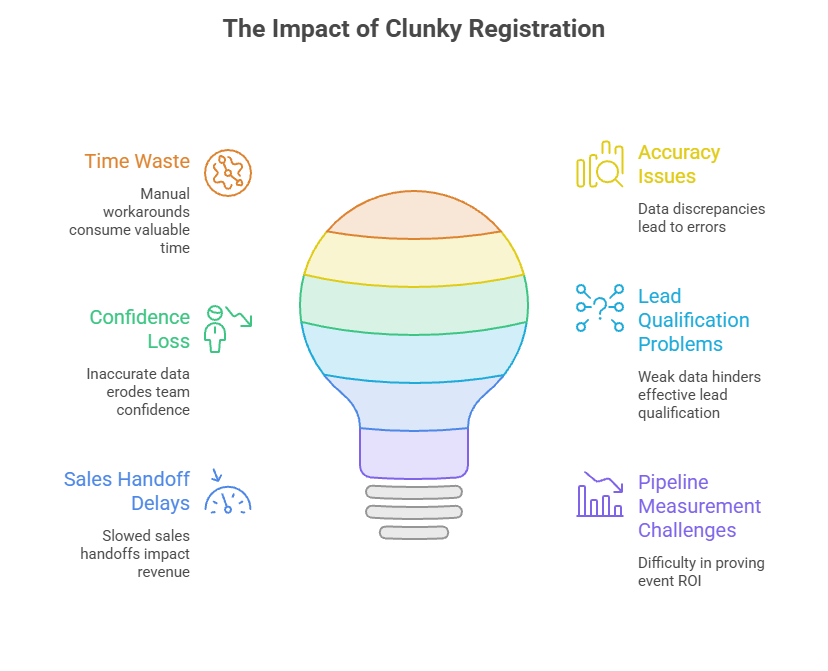 The real cost of clunky registration and weak event data
When your registration tool creates manual workarounds, your team pays for it in time, accuracy, and confidence. Spreadsheets replace synced data. Staff spends the morning of the show fixing badge errors instead of setting up the booth. Follow-up emails go out late because no one can tell who actually showed up versus who just registered.
The downstream cost is real. Weak attendee data means weaker lead qualification, slower sales handoffs, and almost no ability to prove whether the event generated pipeline. That is the problem the best event registration platforms are built to solve.
What the best event registration platforms should help your team do
The right platform does more than collect names and email addresses. It should accelerate attendee flow at the door, feed clean data directly into your CRM, support your booth staff during live execution, and give you reporting that connects event activity to actual business outcomes. According to Bizzabo, 73% of event organizers say event technology is critical to improving event success. That means software choice is an operational decision, not just a procurement one.
What Event Registration Platforms Include and How They Differ
Not every tool in this category is built for the same job, and understanding the differences will save you from evaluating the wrong options.
Event registration platform vs event registration software vs ticketing tool
These terms get used interchangeably, but they describe different scopes. A ticketing tool handles payment and seat allocation. Event registration software manages attendee sign-ups, confirmations, and basic data collection. An event registration platform goes further, supporting check-in workflows, badge printing, session management, integrations, and reporting across the full event lifecycle.
Platform types: simple registration, conference management, and event ops ecosystems
Most tools fall into one of three categories:
- Simple registration tools handle sign-up forms, confirmation emails, and basic attendee lists. They work for small events but rarely support on-site operations.
- Conference management platforms add session scheduling, speaker management, and multi-track registration. They suit larger events with complex agendas.
- Event ops ecosystems combine registration, check-in, lead capture, badge printing, and CRM integration into one connected workflow. These are built for teams that run multiple in-person events and need repeatable, measurable results.
Why in-person event teams need more than a nice registration page
A polished registration page will not help your staff when the check-in line backs up, or a walk-in attendee needs a badge printed in 30 seconds. In-person events demand tools that perform under pressure, not just tools that look good in a browser. Evaluate platforms on on-site usability, lead capture depth, integration reliability, and how quickly your team can resolve issues during a live show.
How to Choose the Best Event Registration Platform for Your Team
The right choice depends on your event model, your team's capacity, and the specific operational gaps you need to close before the next show.
Start with your event model and team reality
Before you compare features, get clear on your actual situation:
A team running two conferences a year has different needs than one managing 15 trade show appearances. Matching platform scale to event scale prevents you from overpaying for complexity you will never use, or underpowering a high-volume operation.
Prioritize the features that affect check-in, lead capture, and follow-up
Focus your evaluation on the functions that directly affect what happens at the booth and after the show:
- Custom registration forms with required fields and conditional logic
- Mobile or kiosk check-in with fast attendee search
- On-site badge printing, including walk-in handling
- Lead retrieval with qualification fields and note capture
- Session-level attendance tracking
- Post-event data export or direct CRM sync
These features separate a smooth event from a chaotic one. If a platform is weak in any of these areas, no amount of front-end polish will compensate for it on show day.
Evaluate integrations before you evaluate polish
Disconnected systems create the exact follow-up and reporting problems you are trying to eliminate. Before you get excited about a platform's design, confirm it connects reliably with your CRM, marketing automation tool, and email platform. Test whether field mapping is clean, whether syncs happen in real time or on a delay, and how duplicates are handled when the same contact registers for multiple events.
A promised integration that requires manual CSV exports every Monday is not an integration. It is just a different spreadsheet problem.
Test usability for the people who will run the event
The person who sees the demo is rarely the person managing check-in at 7:45 a.m. on event day. Run your evaluation with the staff who will actually use the tool under pressure. Ask them to simulate a walk-in registration, a badge reprint, an attendee name correction, and a lead note entry. If any of those tasks take more than a few taps, the platform will slow your team down when it matters most.
Compare pricing in terms of total workflow cost, not subscription alone

- Per-attendee or per-registration transaction fees
- Add-on costs for badge printing, lead retrieval, or advanced reporting
- Hardware requirements such as scanners, printers, or kiosks
- Implementation and onboarding time for your team
- Support tier costs for live event assistance
- The hidden cost of manual work the platform fails to eliminate
A platform that saves your team four hours of post-event data cleanup per show is worth more than one that costs $200 less per year but leaves you exporting spreadsheets every time.
The Features That Separate Strong In-Person Event Platforms From Average Ones
Once you have narrowed your shortlist, these specific capabilities determine whether a platform holds up in real event conditions.
Registration and form controls that improve attendee data quality
Data quality problems almost always start at the registration form. Look for platforms that offer field-level customization, required field enforcement, conditional logic (so the form adapts based on attendee type), and data validation that catches formatting errors before they reach your CRM. Approval workflows are valuable for invite-only events or tiered access models.
Clean data in means clean data out. Every shortcut at the form level costs you time in post-event cleanup.
Check-in, badge, and on-site workflow tools that reduce bottlenecks
Bizzabo research shows that 65% of event organizers cite attendee engagement as their biggest event challenge. A slow check-in line is often the first engagement failure. Strong platforms offer:
- QR code or barcode scanning for fast check-in
- Kiosk and mobile app options so staff are not tied to one station
- On-demand badge printing with template controls
- Walk-in registration that does not require a separate workflow
- Real-time attendee count and check-in status visible to all staff
Lead capture and booth-level data that support sales follow-up
Registration and lead capture are two different functions, but the best platforms connect them. When a sales rep scans a badge at your booth, they should be able to add qualification notes, tag the lead by interest or product area, and have that data sync to the CRM before the show floor closes. Look for platforms that support custom lead fields, scoring or rating options, and direct integration with your sales team's tools.
This is where registration choice directly affects revenue. A booth that generates 200 scans with no qualification data is far less valuable than one that generates 80 scans with clean, segmented lead records.
Reporting and attribution features that make ROI easier to prove
Event ROI is hard to prove when your data lives in three places. Prioritize platforms that offer source tracking on registrations, campaign tagging, attendance reporting by session or zone, and export formats that map cleanly to your CRM's opportunity or contact records. The goal is to connect a registration to a booth visit to a sales conversation to a closed deal, even if that chain takes 90 days to complete.
Branding, automation, and support features that save time without adding complexity
For lean event teams, time saved on admin is time gained for execution. Look for white-label registration pages, automated confirmation and reminder emails, reusable event templates, and role-based permissions so staff only see what they need. Responsive support during live events is non-negotiable. A platform that goes dark on event day is a liability, not a tool.
Your page should answer 3 questions in order:
- What is this event, when and where?
- Is this event for me and why should I care?
- Is it easy to act on this now?
Common Buying Mistakes When Comparing Event Registration Software
Most platform regrets come from the same set of avoidable decisions. Here is where teams consistently go wrong.
Choosing for feature volume instead of event-fit
Enterprise platforms with hundreds of features are impressive in demos and overwhelming in practice. If your team mainly needs reliable in-person registration, a clean badge workflow, and CRM-ready lead data, you do not need a platform built for 10,000-person conferences with virtual streaming, multi-language support, and AI-powered networking. Buy for your actual event model, not the one you might run someday.
Ignoring on-site operations until the week of the event
Teams often select software based entirely on the pre-event registration experience and only discover check-in problems during setup. Validate on-site workflows during your trial period. Run a simulated check-in with real staff, test badge printing, and walk through a walk-in scenario before you sign a contract.
Assuming integrations will work cleanly without real testing
A native integration listed on a pricing page is not the same as a tested, reliable data connection. Before committing, map out exactly which fields need to sync, confirm how duplicates are handled, and test a real data push from the platform to your CRM. Discovering broken field mapping the week of an event is one of the most stressful problems an event team can face.
Overlooking adoption, support, and contingency planning
Ask every vendor three questions before you buy: How long does onboarding take for a team of our size? What support is available during a live event? What is the backup plan if the internet goes down on-site? Platforms that cannot answer those questions clearly are not built for real event conditions.
Your Best Next Step: Build a Shortlist Around Workflow, Data, and ROI
A focused evaluation process will get you to the right platform faster than comparing feature lists alone.
A practical shortlist framework for demos and trials
Use this checklist when evaluating any platform:
- Does it support your event type and attendee volume?
- Can staff complete check-in, badge printing, and walk-in registration without training on the day?
- Does lead capture connect directly to your CRM with clean field mapping?
- Does reporting give you source tracking and attendance data you can act on?
- Is the total cost (including fees, hardware, and support) within budget?
Questions to ask before you commit
- How long does implementation take, and what does onboarding include?
- Who owns the attendee data, and how is it exported or deleted?
- What support is available during live events, and at what tier?
- How does pricing scale as event volume or attendee count grows?
- Can you show us a real post-event report from a comparable event?
The Booth Side of the Equation Still Needs to Deliver
Choosing the right registration platform closes the data and operations gap, but it does not replace the physical presence that draws attendees to your booth in the first place. Bizzabo reports that 79% of event marketers say in-person events are critical to their company's success. That means your booth environment needs to match the professionalism of your event tech stack.
If you are rebuilding your event setup alongside your software stack, start with the display hardware that makes your brand visible from across the floor. Browse trade show booth kits and packages at Backdropsource to find a setup that installs in minutes and holds up across multiple shows.

 0 Years
